Total Pageviews are you looking

Translate traducir 翻譯 翻訳する แปลง переводить übersetzen traduire

Showing posts with label android. Show all posts

Wednesday, May 23, 2012

Vodafone Germany And HTC Announce The One XL Smartphone Arrives In Germany By June


You can add Germany to the list of countries lucky enough to be graced with the HTC One X One XL LTE smartphone. Vodafone Germany and HTC made a joint announcement one of the most popular smartphones in the game will be available in early June and will come in both black and white flavors across German carriers such as Deutsche Telekom and O2 Germany, though Vodafone Germany will the black version only in its stores. As you might have already expected, the device will be identical to the American 4G LTE version of the One X smartphone and feature a dual-core Snapdragon processor, 4.7-inch 720p HD screen and of course Android 4.0 with a heavy dose of Sense 4.0 + goodies. Germans will especially be delighted as the One XL will come equipped with 32GB of memory and of course 25GB of cloud storage courtesy of Dropbox.
So now it’s official: Germany will get their opportunity to own the best Android phone available in a matter of weeks. Break out the Schwarzbier and get ready to celebrate!
source: The Unwired

Rumor Suggests Microsoft Office Heading to Android in November


These days Android tablets are becoming more and more a suitable outright replacement for laptops. Coupled with a keyboard dock, an Android tablet can pretty much do anything you could do on a laptop although some would say the available software can be limiting. According to BGR, Microsoft plans to change that belief by releasing its full suite of Office applications for Android tablets. The rumor suggests that Microsoft is targeting a November release not only for Android, but iOS products as well. It is believed that since iOS products go beyond just the iPad, Microsoft’s upcoming mobile Office suite could possible work on smartphones as well. This could mean availability for Android smartphones, too, but that is just a hunch at this point.
Now I realize that there are plenty of other options out there that basically reproduce everything that Office can do, it just sure would be nice to have everything packaged neatly into one solitary app. What do you guys think, is this something you would be interested in for your Android device?
source: BGR

The verdict is in. Google did not breach Oracle patents.


Not Guilty. Finally the two words that Android fans worldwide were waiting to hear have been uttered, bringing and end to lengthy court case . After a week long deliberation the jury in California ruled in favour ofGoogle declaring that the search giant did not infringe on Oracle’s patents with Android. Earlier this month we brought you the news that the jury had concluded that Google had infringed on 37 separate API’s. The jury has since concluded that Google adequately demonstrated that it felt it was acting within the law due to its belief that it didn’t need a license to utilise java,
The news represents a significant victory for Google who would have been set to pay damages of up to $1bn should it have been found guilty. Naturally, both firms have released statements post verdict.
Oracle:
Oracle presented overwhelming evidence at trial that Google knew it would fragment and damage Java. We plan to continue to defend and uphold Java’s core write once run anywhere principle and ensure it is protected for the nine million Java developers and the community that depend on Java compatibility.
Google:
Today’s jury verdict that Android does not infringe Oracle’s patents was a victory not just for Google but the entire Android ecosystem.
So another law suit bites the dust; Google and Android live to fight another day. Do you think we’ve heard the last of it or will Oracle by ready to launch an appeal? Let us know your thoughts in the comments below.
Source: Verdict

Monday, May 21, 2012

Amazon begins rolling out the beta for their Test Drive App Store feature on Android phones

Amazon’s web-based Test Drive app has begun rolling out in beta form onto select Android phones. Amazon’s Test Drive was an applet on the Amazon App Store which allowed gamers to test drive Android games and applications through the browser before making the decision to buy the game or app they were trying out.


Amazon begins rolling out the beta for their Test Drive App Store feature on Android phones

Thursday, May 17, 2012

only for andriod users screen your phone


Screenshot UX Trial


this great app most have andriod users 

Screenshot UX Trial
after using this app in two days i love it when you have something on your phone you can now share it it takes a pic of your screen you seen so facebook,twitter and so on can now share it this was used on lg optimus by tmobile 

Description

You can take a snapshot for android device.
Screenshot app for Android device(Phone/Tablet).
May require a rooted phone.
Phone list that follows does not require the roots.
- Gallaxy series (S,S2,...)
- HTC phones (Sensation, ...)
- Motorola (Atrix, ...).
- LG Optimus series (G2X, ...)
* Rooting may be needed depending model. Test your phone.

Features:
- Analyzing possible capture method.
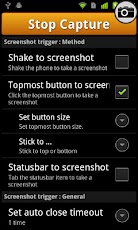
- Intuitive Topmost button to screen shot.
- Shake to screen shot.
- Status bar to screen shot.
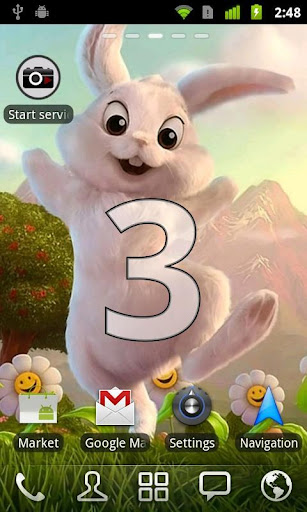
- Intuitive Countdown feedback UI before screenshot.
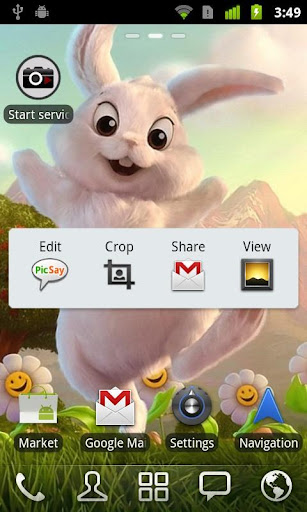
- Edit(Crop, Draw/Undo/Redo, ...).
- Share menu integration for Email, MMS, ...
- Choose custom save folder
- Fast start shortcut (Long tab empty home screen > Shortcuts > Select ScreenshotUX icon).

* IF YOUR DEVICE NEEDS ROOT and NOT ROOTED(and not support preloaded capture method),
You have to initialize screenshot service with your desktop.
(There is no other way due to Android security model).
Simply, Attach your phone to your desktop, and execute desktop app(You can download Liveov website, http://goo.gl/oV7vB).
More detail instruction guide is embedded this app.
* You can take 14 screenshot in trial

Used permissioins:
- INTERNET: for connect to localhost screenshot server for rooted phone.
- SYSTEM_ALERT_WINDOW: for topmost camera button.
- VIBRATE: for vibrate feedback.
- WRITE_EXTERNAL_STORAGE: to save the screenshot.
- GET_TASKS: for detect foreground Develoment setting activity for non rooted&non preloaded capture method.
- RECEIVE_BOOT_COMPLETED: for boot on start option on ICS.
Tags: screenshot screen capture snapshot no root rooting

my phone never been rooting or jaw too
  
(16,074


i give it 4 out of 5 too 


Check out Screenshot UX Trial on Google Play! https://play.google.com/store/apps/details?id=com.liveov.shotuxtrial


Wednesday, May 16, 2012

join foursquare

you don't know what you missing better then yep

&*rm home http://tinyurl.com/6uk75ld & store http://goo.gl/TBmOS

this app gets 4 out of 5 free too


Thursday, May 10, 2012

T-Mobile adds 187,000 subscribers in Q1

T-Mobile

T-Mobile today announced its first-quarter 2012 earnings, adding 187,000 net subscribers in the first three months of the year, compared to a loss of 99,000 a year ago. Money-wise, TMoUS saw operating income rise $7.2 percent to $1.27 billion, and average revenue per user jump a couple bucks to $58. The big talk from T-Mobile this week at CTIA, however, is life after the failed AT&T acquisition. And to that end, it's continuing to upgrade its network with an announced $4 billion modernization plan that will pave the way for LTE service in 2013.
Total customers now stand at 33.4 million -- up a couple hundred thousand from the end of 2011, but still 200,000 below Q1 2011.
More: T-Mobile

Leaked Samsung device possibly headed to Sprint

Samsung SPH-L300


Here we see an image of what is claimed to be the Samsung SPH-L300 which, based on its product code, appears to be destined for Sprint in the near future and the folks over at BriefMobile got the first look at this rumored device.  If it hadn't already struck you as looking familiar with it's big silver chin, the HTC Nexus One comes to mind for us but the internals are a definite departure from that original Nexus phone.
Rumored to sport a Qualcomm MSM8960 processor (the Snapdragon S4 chip) which is the same unit as in the LTE enabled HTC One X and Sprint HTC EVO 4G LTE, this phone should pack quite the punch should it come to fruition.  Other features and specs this device is reported to have include 1 GB of RAM along with 4 GB of ROM, 4G LTE, NFC, and Bluetooth 4.0 all underneath Android 4.0.4 Ice Cream Sandwich.  However, the display resolution is quite disappointing at only 480x800.  With all that hardware inside, we'd hope to see a 720p resolution display or at least a qHD display, but keep in mind this is still an unconfirmed device and that means things are subject to change.  We'll bring you more info on this as it rolls in.
Source: BriefMobile

Monday, May 7, 2012

MasterCard aims to bring wireless payments to all with PayPass Wallet

MasterCard PayPass


While the show down here at CTIA doesn't officially open until tomorrow, the folks at MasterCard held an event this evening to let us in on some of their big news that they have coming. It has become very obvious that people want to be able to quickly and easily pay for things, they want a one click payment and a quick in store experience and that is exactly what they have landed here. PayPass from MasterCard brings quick and easy mobile payments both in the form of using NFC while out and about, as well as a simple one click payment while shopping online.
While it won't be in our hands just yet, the folks at MasterCard are aiming to have this out there for the public in Q3 of 2012, which isn't all that far off. Beyond the development that they have done, they are also opening up the API for this, allowing third party developers to integrate these great new features into their applications as well. From a simple tap and go payment in a cab or at the store, to a one click order of a plane ticket or anything else, this is definitely something many will enjoy. Don't worry, if you don't have a MasterCard you won't be left out of all the features, they are working with other card companies and manufacturers to ensure that they people are taking full advantage of the powerful technology that they are bringing to the table. Full release after the break.

Samsung Galaxy Tab 2 7.0 review: Will this be the first tablet to threaten the Kindle Fire?


There is no shortage of tablets for Samsung. They had the first mainstream Android tablet with theGalaxy Tab back in 2010. That was a 7-inch tab and since then, they’ve released the Galaxy Tab 10.1, the Galaxy Tab 8.9, the Galaxy Tab 7.0 Plus. and the Galaxy Tab 7.7. Samsung has admitted that sales haven’t blown anyone away. For now, the only real successful Android tablet is theAmazon Kindle Fire. Amazon changed the game when they started selling it for $199. No more can Android manufacturers continue to put out tablets costing $500+. It’s now a price war and Samsung is all in. At $249, the Galaxy Tab 2 7.0 is still priced higher than the Kindle Fire, but it includes Ice Cream Sandwich and the full Android experience with the Google Play Store. Will the mainstream flock to it? This is my full review, but you can also check out my quick hands on.
Design
Samsung rarely impresses me when it comes to build. Most of their devices have too much plastic and is either too shiny or glossy. The Galaxy Tab 7.7 LTE really impressed me, but that was a $499 tablet with LTE capabilities. Knowing this tab is priced at $249, I didn’t expect much, but I was pleasantly surprised. It’s plastic, but it’s not as slippery or glossy. It’s also very solid. I think the build of the Kindle Fire is a little better, but it’s also thicker and heavier. The Tab 2 comes in at 10.41mm and weighs 344 grams. The Kindle Fire is 12.7mm thick and weighs a whopping 414 grams. I prefer the Tab 2.
As far as buttons and ports go, there isn’t anything extraordinary in the design as opposed to previous Galaxy Tabs. When holding it in portrait mode, the power button is on the right side at the top and below that is the volume rocker. The proprietary charging port is at the bottom along with the stereo speakers. On the left side you will find the micro SD port and the IR port. At the top you will find the microphone jack.
Hardware
The Galaxy Tab 2 7.0 has a 7-inch (1024 x 600) PLS display, 1 GHz dual-core processor, 1GB of RAM, 3MP rear camera, VGA front camera, 8 GB of internal storage, microSD for up to an additional 32GB of storage, 4000 mAh battery, Bluetooth 3.0, GPS, and WiFi.
Performance
The 1 GHz dual-core processor seems ancient right now. The original XOOM has a 1 GHz dual core and that was released a little over a year ago. Still, even though it seems so 2011, a 1 GHz dual-core should satisfy most consumers. Everyone knows by now that I’m not into benchmarks, but I always do the AnTuTu just because. It came in at 5006, which puts it a little above the Kindle Fire as expected. What is most interesting is that this score is higher than the Galaxy Tab 7.7 (4948) and the DROID XYBOARD 8.2 (4587). Both have better processors. This is why I don’t care for benchmarks. Bottomline is that it acts like a 1 GHz dual-core, and for a $249 tablet, you will find it’s quite snappy.
The PLS display is simply not as stunning as the Super AMOLED Plus on the Galaxy Tab 7.7, but Samsung makes great displays and the viewing angles are really good. It’s on par with it’s main competitor, the Kindle Fire and is also better than the ARCHOS G9 80 Turbo ICS I reviewed recently.
Samsung gives you stereo speakers unlike the ARCHOS G9 (one mono), which sound better. They certainly aren’t going to wow you, but they get the job done
Battery
The 4,000 mAh battery is around 25% smaller than the Galaxy Tab 7.7 LTE and it shows. I ran the continuous video test where I run continuous video while the display brightness is set at about 2/3′s. Since this doesn’t have a cellular radio, I did it while connected to WiFi. I was able to get about 7 hours, which isn’t all that great. Since the battery is about 75% of the 5100 mAh that’s in the Tab 7.7, this seems low considering the Tab 7.7 was able to get about 12 hours (.75% of 12 would be 9 hours). It’s actually worse when you consider The Tab 7.7 battery numbers were while it was connected to 4G LTE. So basically the Tab 2 couldn’t even get 75% of the performance of the Tab 7.7 while only connected to WiFi. I would’ve liked to have seen more, but I do think 7 hours is enough for the average consumer between charges.
Software
The Tab 2 7.0 might not be as great specwise as many of the newer tabs, but the one thing that it has going for itself is Ice Cream Sandwich. You won’t find that in any of the previous Samsung tablets. It’s definitely a treat, but unfortunately Samsung’s TouchWiz pretty much has the same look as the Honeycomb version. You will find the ability to swipe to kill apps and folders, but other than that you really wouldn’t know it’s ICS. People familiar with TouchWiz will probably welcome it.
It’s not all about the UI as Samsung has included some decent apps. To go along with the IR port, they added the Peel Smart Remote app. This is something they started with the Galaxy Tab 7.0 Plus. Here’s the quick hands on video I did for that tab of which I spent a little time with the Peel Smart Remote app. It starts at around 4:20 in.
Dropbox is also included, but the big news is that you will get 50GB of storage for one year. This is double the space that HTC users get, but HTC users get their 25GB for 2 years. I would rather have the 25GB for two years, but I won’t complain about 50GB of free space.
As far as the bloatware, you get Amazon Kindle, Dropbox, Netflix, and the Peel Smart Remote. Samsung’s included app extras include All Share, ChatOn, Game Hub, Media Hub, Memo, Music Hub, Music Player, Photo Editor, Samsung Apps (app store), Screensaver, S Planner, and Video Player.
Camera
Samsung threw in a 3MP rear camera for what I don’t know. I guess to one-up Amazon. but when it comes to tabs, you really only need the front facer. Samsung gave us a VGA (640 x 480) front facer, which is a little low. I would rather have seen them do what ARCHOS did and only put a front facer in and make it better quality then trying to cover both. The front facer is more likely to be used with video chatting than taking pictures. Nonetheless, it’s something the Kindle Fire doesn’t offer so I guess we can’t complain. I’m not going to post any pictures because honestly, if you’re really worried about the quality of pictures this tab takes, you probably shouldn’t be buying it. The picture taking abilities are good enough for what it is.
Closing
If you’re looking for a reasonably priced Android tablet (in the 7-inch range) with Ice Cream Sandwich, you won’t find a better deal other than the ARCHOS G9 80 Turbo ICS. Both are priced the same, but Samsung has a better name. The real question is if this is a better buy than theAmazon Kindle Fire? The Tab 2 is $50 more, but lets look at what you get that you won’t find on the Fire. You get an IR blaster, a microSD slot for added storage, a rear camera, a front facing camera, Bluetooth, widgets, 512MB more RAM, and access to the Google Play Store for over 450,000 apps. These items more than outweigh the $50 in extra cost. If you think about it, there’s nothing the Kindle Fire offers more because the Kindle app is available for the Tab 2 so you can still buy and read your books from the Kindle store. In fact it’s already installed out of the box.
So is the Galaxy Tab 2 7.0 the Kindle Fire killer? Probably not, but not because it isn’t better. It will most likely fail because of marketing. I don’t see Samsung spending the dollars to get mainstream consumers to buy it. Unfortunately they’re relying on sites like this one and word of mouth to spread the word, which won’t cut it. Still, it’s up to me as a reviewer to recommend the tablet that makes most sense. If you’re thinking about buying a Kindle Fire, or a Nook for that matter, you need to turn your attention to the Samsung Galaxy Tab 2 7.0. It simply is the better tablet and offers you so much more.


Sunday, April 29, 2012

Twitter for Android gets another minor update

Twitter for Android has a small update in the Google Play store this evening, bringing it to version 3.2.1. The change log is short -- crashes for users that use the app in Dutch, Finnish, and Hungarian have been fixed, and the Indonesian language has been added. Grab the update from the Google Play store or hit the link after the break.

Meon makes its way to Android!

Those of you old enough to remember Windows Mobile no doubt played Meon at some point. The idea's simple enough — you use light to free the cute little Meons from whatever it is that's keeping them trapped. The game starts out simple, but pretty soon you'll be bouncing light off mirrors and changing colors with prisms to the point that you're not sure what started where, or where it's going to end up. It's strangely addicting. The Android version is faithful to the original. Our only real complaint is that it doesn't really take advantage of the larger screen sizes. Meon Lite gives you access to the first 32 levels, though chances are if you're anything like us, you'll spring 99 cents to get all 120 levels in the full version. We've got download links after the break. Download: Meon Lite (free), Meon full (99 cents)

Monday, April 9, 2012

Spring cleaning tips for your Android device

Spring cleaning is about more than actual cleaning -- it's about getting a fresh start. The latter of these can simply mean changing things around so that the experience feels new. Here are some of the cleaning basics for your Android device, and also some tips on how to make other parts you can't change feel a bit of that spring rejuvenation.

We all have too much "stuff," as the famous comedian George Carlin told us, and chances are that you can afford to get rid of some of it.

Remember that app you tried and didn't like? Or the game your friend suggested that you couldn't get into? Start removing Android apps and games you haven't used or played in quite a while. If you change your mind later, just redownload them!
Often, an app will create a folder and configuration file with user data that gets left behind after an uninstall. Grab a file explorer app like Astro File Manager, which will let you explore the data folders created by apps, to get rid of these.
You may not realize it, but your Call Log and SMS history can eat up a more than healthy portion of memory. Cleaning them out will not only make these apps run more efficiently, but other apps will, too.History Eraser for Android can do the work for you, if you're not sure how.
If data consumption isn't an issue, or you often find yourself on a Wi-Fi connection, there's no reason you can't move some of your files off your device to the cloud. Get your data migration started with apps like Dropbox and Google Music.
The previous suggestions not enough to make your Android feel faster? There's always the option of performing a Master reset on your device, which will erase ALL apps and data.

Tired of seeing the same clock, calendar, or wallpaper? Do your ringtones or notifications make you cringe because you've been hearing the same ones for soooo long? Time to fix that.

Download some new widgets to change the style of your clock, weather, or date displays. If you're not sure where to start, try Beautiful Widgets because it offers a huge collection of skin styles that are sure to impress.
Wallpaper is the backdrop for all of your app icons and widgets, so it should be something you love to look at. If it's not, grab a wallpaper app like Best Wallpapers HD to pick out something new.
Ringtones and notifications are what keep you connected to other people by alerting you of new messages. You can use Zedge or a similar app to find some new sounds that won't make you want to smother your device every time it rings. Or, if you want to keep your current sounds, learn how to automatically adjust the volume based on surroundings.
If you're looking for a complete overhaul of your Android's interface, try a launcher to replicate other versions of Android or to apply a new color scheme. ICS Launcher and Go Launcher are good picks with lots of theme options to get you started.

Saturday, February 11, 2012

go there rate this story

♡♥♡♥♡♥♡♥♡♥♡♡♥Att:Rate In The Next 10 Seconds to be loved or find love ąŋd mąķę yoųŗ Valentine's Day gŗęąţ GO! Įƒ wąŋţ lovę ŗąţę 5☆☆☆☆☆ ţђęm CΩMMΣΠT GΩ TIMΣS ΔLMΩST UP IҒ LΩ∇ΣD RΔTΣ 5☆☆☆☆☆ CΩMMΣΠT ШHΩ THΣ PΣRSΩΠ IS ツツツツツ♡♥ ツ♡♥♡♥♡♥♡♥♡♥♡ Sent from Love Poems http://bit.ly/34a7xx